
One useful insightClear enough to remember and use.
Private camera practice
Practise privately.
Improve one thing.
Take it forward.
Take One helps you practise on camera, build confidence and improve before you publish.
Available now on the App Store for iPhone.
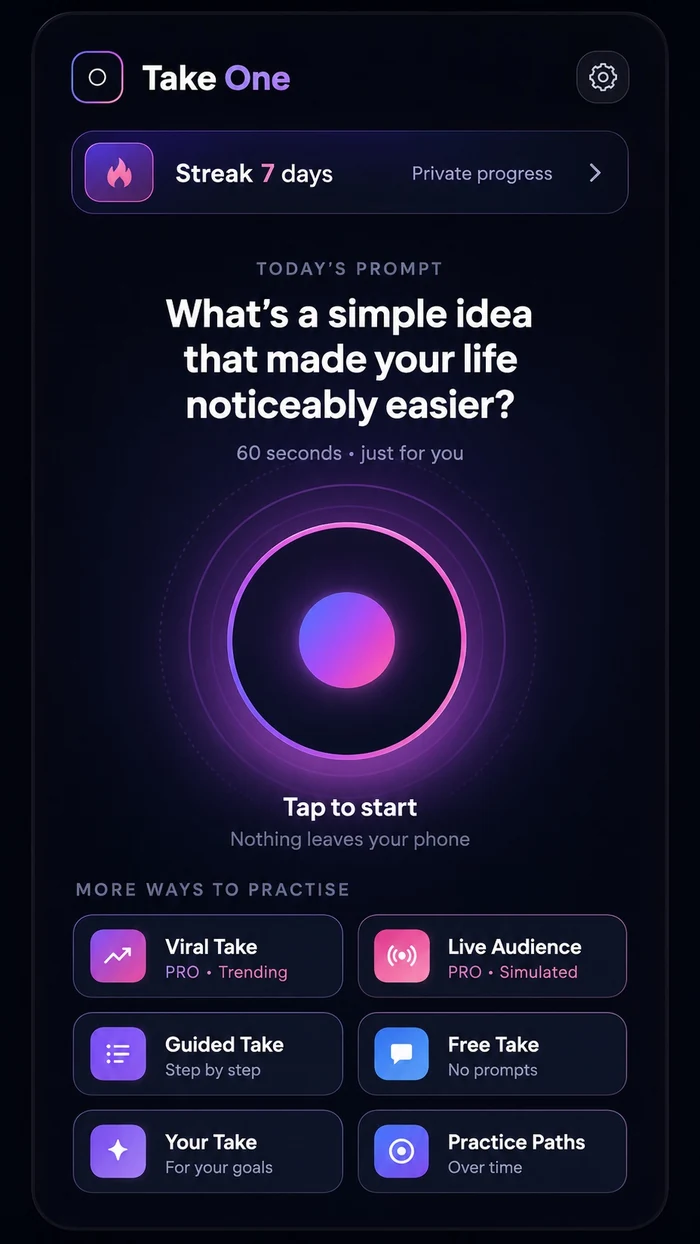
Private by defaultYour video stays on your device.
How it works
A simple loop you can actually use.
Take One helps you practise, learn one useful thing and apply it to your next take.
Choose a take
Use Today’s Take, record freely, follow a guided route or choose a suggestion made for you.
Record privately
Your video remains on your device while you practise and review.
Review or get one insight
Review privately, or deliberately request optional Pro coaching that processes temporary audio only.
Take it forward
Retry with one clear goal, save when ready or share using the iPhone share sheet.
From hesitant takes to confident practice.
- Not knowing what to practise
- Rambling through repeated takes
- Stopping because nothing feels right
- No clear idea what to improve
- A fresh prompt or talking point ready to use
- Private retries with no audience pressure
- One focused improvement for the next take
- A clearer route from practice to publishing
Designed for progress
Practice makes progress.
Most tools tell you what happened. Take One helps you improve what happens next.
Prompt
Record
One useful insight
Next take
Privacy first
Your camera practice stays yours.
Your videos remain on your device and are never uploaded for coaching. Take One is not connected to your social accounts, so it cannot publish or accidentally share a recording.
Video stays on your device
Review it, retry it, save it or delete it privately. Optional coaching never requires your video to be uploaded.
AI only when you ask
Pro coaching begins only after a deliberate request and a clear explanation of temporary audio processing.
No hidden judgement
No facial recognition, voice identification, emotion scoring or personality scoring. Recordings are not used to train AI models.
Free and Pro
Private practice first. Optional AI when useful.
Core recording, review, retry, saving and sharing remain available without an account.
- Free practice includes Today’s Take, guided routes and personalised suggestions.
- Take One Pro adds one focused AI improvement and before-and-after retry comparison.
- Pro also includes Viral Take and the local simulated Live Audience.
- Video is never uploaded for coaching.
Take One is available now on the App Store for iPhone.
Take One Pro Monthly
One focused improvement. Then try again.
The UK launch price is £5.99 per month. Eligible users can start a 3-day free trial with up to five completed AI coaching cycles.
20 completed cycles per paid month
Each complete cycle includes transcription, coaching, retry transcription and comparison, with a daily safety limit of five.
No commitment — cancel anytime
Apple shows the localized price and renewal terms before purchase. Manage or cancel through Apple Account settings.
Does Take One upload my video?
No. Optional coaching processes temporary audio only after you request it.
Do I need an account?
No account is required for ordinary private recording, review, retry, saving or sharing.
Where can I download it?
Take One is available now on the App Store for iPhone.